Free Protectors for 12 months
In Stock
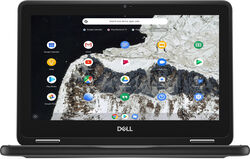
Dell Chromebook 11 3100 Screen Replacement in Huddersfield
If your Chromebook 11 3100 has suffered damage such as a broken screen or a blank screen, our expert technicians can complete the repair in just around 45 minutes, ensuring your Chromebook 11 3100 is back in perfect condition swiftly.

Based on 9206 reviews
45
Minutes repair time

Life time Warranty
212
Screens repaired
Chromebook 11 3100 Repair Services
Your go-to destination for Dell repair services, specialising in all Laptop including Chromebook 11 3100 repairs.

Battery Replacement Repair
£50.00
Charging Port Repair Repair
Speaker Repair Repair

Device Diagnostics Repair

Screen Replacement Repair

Water Damage Repair Repair
Professional Chromebook 11 3100 Screen Replacement Repair in Huddersfield
Choosing where to repair your Dell Chromebook 11 3100 Screen Break in Huddersfield means you’re choosing speed, reliability and real value. At iRepair Guys Marsh, we’re locals who fix more Chromebooks than you’ll find in most high street chains. We serve Huddersfield and Preston with same-day service, using high-quality parts and engineers who understand every hinge, LCD matrix and digitiser. Our team has completed hundreds of Chromebook repairs, and we back every repair with a warranty that beats Apple’s 90 days. We’re focused on speed: typical screen fixes finish in 30-60 minutes on site or in our Marsh workshop, so you’re never waiting days for a repair. Locals choose us because we’re transparent, friendly and available when you need us. Reach us at 07493648968 or [email protected], or pop in at 142 Westbourne Rd, Marsh, Huddersfield HD1 4LF for a same-day assessment. Walk-ins welcome; mobile repairs travel across the Huddersfield area.
Choose Your Repair Option
Transparent pricing with no hidden costs
Standard Repair
30-60 minutes
-
High-quality parts
-
12-month warranty
-
Same-day service
-
Full testing
-
Free diagnostic
-
Data protection
Most customers - excellent value
Premium Repair
-
OEM-grade parts
-
24-month warranty
-
Priority service
-
Free screen protector
-
Advanced calibration
-
Water resistance check
-
Deep clean
Best value - OEM quality
Why Choose Us Over Dell?
Save £200-£300+
| Feature | iRepair Guys | Dell |
|---|---|---|
| Price | £0.0 | 3-4x higher |
| Repair Time | 30-60 min same-day |
3-5 days |
| Warranty | 12-24 months |
90 days |
| Appointment | Walk-in or same-day |
1-2 weeks wait |
| Service Options | Walk-in, mobile, mail-in |
Store only |
About Our Screen Replacement Repair Service
Dell Chromebook 11 3100 Screen Break repairs cover cracked LCDs, digitiser faults, backlight failure and bezel damage. We start with a Free Diagnostic and a clear quote before we touch your device. We only use high-quality parts sourced from trusted suppliers, tested in-house for compatibility and durability, and we confirm data protection before repair. Our fixed-price approach means no surprises at collection.
- High-quality parts fitted to exact Dell Chromebook 11 3100 specifications
- Thorough testing after repair ensures display, touch and backlight work as intended
- Free diagnostic with no obligation quote
- Strong warranty: Standard 12-month, Premium 24-month
Dell Chromebook 11 3100 Screen Break repairs are completed by technicians with extensive Chromebook experience, using careful reassembly and calibration to preserve keyboard feel and chassis integrity. We document every step for you, so you know exactly what was done and why, and we stand by our work with a warranty that far exceeds typical high street options.
Why Customers Choose iRepair Guys
Expert Technicians
Our team has 8+ years of Chromebook repair experience and has completed hundreds of successful Dell Screen Breaks, delivering reliable fixes with careful component handling.
Lightning-Fast Service
We offer 30-60 minute repairs on-site or in our Marsh workshop, making us significantly quicker than Apple’s typical 3-5 day turnaround.
Premium Parts & Warranties
We use high-quality parts and provide 12- or 24-month warranties, plus rigorous testing to ensure stability beyond Apple’s 90-day period.
Transparent Pricing
No hidden fees or surprise charges; our quotes are clear, with options for students and local businesses to maximise value.
Convenient Options
Walk-in, mobile repair vans and mail-in service give you flexibility to fit around work, study and family commitments.
Outstanding Satisfaction
We maintain strong local trust with high repeat business and a customer-first approach to fix minutiae and make things right.
Our Repair Process
Simple, transparent, and efficient
Book Your Repair
Simple online or phone booking with same-day slots available; you can secure a time that fits your schedule in under 2 minutes.
2 minutes
Free Diagnostic
Our technician performs a quick, thorough examination to identify the fault and provide a no-obligation quote before any parts are touched.
5-10 minutes
Professional Repair
Skilled technicians replace or repair the affected components with precision, following Dell’s specifications and our in-house standards.
30-60 minutes
Quality Testing
Post-repair testing confirms display clarity, touch responsiveness, backlight stability and overall device performance.
10-15 minutes
Collection & Warranty
Collect your device with a clear warranty document; we verify you’re satisfied and explain any care tips for long-term longevity.
5 minutes
Serving Huddersfield and Surrounding Areas
We are proud to serve Huddersfield with precise, friendly Dell Chromebook repairs from iRepair Guys Marsh. Our main hub is 142 Westbourne Rd, Marsh, Huddersfield HD1 4LF, and you can reach us on 07493648968 or [email protected]. We cover Marsh, Town Centre, Brighouse, Almondbury, Lindley, Moldgreen, Lockwood, Birkby, Dalton, and surrounding areas, with convenient access for locals.
- Areas covered: Marsh, Town Centre, Brighouse, Almondbury, Lindley, Moldgreen, Lockwood, Birkby, Dalton, and surrounding areas
- Transport: Easily accessible via Huddersfield train station (10 min walk), multiple bus routes including 363, 364, 353
- Parking: Free street parking available nearby, public car parks within 5 minutes walk
- Why Huddersfield residents choose us: same-day service, local trust, convenient support
We also offer mobile repair options for on-site fixes across the area so you don’t have to travel far when you need rapid assistance.
Expert Advice & Tips
Common causes of this issue:
- Accidental drops or knocks that crack LCDs and disturb the digitiser
- Pressure from closing the lid with items in your bag
- Hinge stress from frequent opening/closing leading to display misalignment
- Liquid exposure near the keyboard or screen
- Temperature extremes causing backlight failure
- Manufacturing tolerances or wear over time
Prevention tips:
- Use a protective case and screen protector to shield the glass
- Don’t stack heavy items on the device or carry it loose in a bag
- Keep liquids away from the device and wipe away spills immediately
- Store in a padded sleeve when not in use
- Regularly clean ports and vents to prevent overheating
When to repair vs replace:
Short intro: If the display area can be restored with a component swap and the motherboard remains healthy, repair is sensible; if the LCD panel, glass and backlight are compromised beyond safe reuse, replacement may be more cost-effective.
- Repair if the screen shows intermittent faults, touch lag or backlight flicker but the PCB is intact
- Replace if the panel is cracked beyond repair, or if visual clarity cannot be guaranteed after repair
- Consider age and cost: if the device is several years old, replacement could offer better long-term value
- Local availability: if a repair would require parts unavailable locally, replacement may be faster
What to look for in a quality repair service: Intro: A reliable service should be open, transparent and accountable.
- Genuine parts with clear sourcing and traceability
- Clear warranty terms and timely follow-up support
- Accurate diagnostics and a no-surprises quote
- Qualified technicians with Chromebook experience
- Cleanroom-like handling and data protection assurances
Red flags to avoid: Intro: Be cautious of low-cost surprises or vague promises.
- No written quote or unclear pricing
- Unverifiable technicians or unknown parts
- Missing warranty or weak aftercare
- Pressure to proceed quickly without evaluation
- Poor data handling or lack of privacy assurances
Maintenance guidance after repair: Intro: Protect your repair so it lasts.
- Regular screen cleaning with microfiber cloths to avoid scratches
- Avoid pressure on the lid and keep the device away from liquids
- Update system software to ensure compatibility with the repair
- Schedule a quick diagnostic check if you notice any new display issues
What Our Customers Say
Grace from Marsh dropped her Dell Chromebook 11 3100 and cracked the screen. She visited iRepair Guys Marsh and was amazed how fast they fixed it: under an hour, with an OEM-grade replacement and thorough testing before she picked it up. The price was transparent with no hidden charges, and the team explained how to avoid future drops. Highly recommended.
Our business near the Town Centre relies on Chromebooks. iRepair Guys sent a technician to our office and fixed three Dell Chromebooks in one visit. Fast, reliable, and the business discount helped us stay within budget. Much quicker and more convenient than an Apple Store, and we didn’t lose productivity.
As a student in Almondbury, I cracked my Chromebook screen just before exams. They quoted quickly and completed the replacement the same day. The price was fair and the student discount helped a lot. Far better than the Apple Store—local, friendly, and I could stay in Lindley libraries while it was done.
I mailed my Dell Chromebook 11 3100 to their Marsh address and got it back with a pristine screen within a week. The mail-in service was straightforward, with regular updates. It’s so reassuring to have a trusted local option instead of waiting on a distant chain for repairs.
With a packed schedule, I needed same-day service. They sent a Mobile Repair Technician to our office in Lindley, replaced the screen on a Dell Chromebook 11 3100, and ran full checks on connectivity and peripherals. We were back in a meeting within hours. Excellent service for busy professionals.
We had two Chromebooks and a tablet repaired in one visit. The team explained the process, gave us a loyalty discount, and showed us tips to protect devices at home in Marsh and Brighouse areas. Fast turnaround and friendly service—great for families juggling several devices.
Frequently Asked Questions
Pricing & Value
Q:
How much does this repair cost?
Pricing for a Dell Chromebook 11 3100 screen replacement varies by screen type and any optional warranty choices you select. We provide a no-obligation, itemised quote after diagnostic assessment, which covers the screen, labour, testing, and any necessary ancillary work. There are no hidden fees, and VAT is included where applicable. We’re transparent throughout the process and will confirm the exact total before any work begins.
Q:
Why cheaper than Apple?
We’re a local, specialist repair service with streamlined processes designed specifically for devices like the Dell Chromebook 11 3100. Our engineers diagnose and repair quickly, often with same-day service in Huddersfield, and we don’t carry the overheads of large Apple Stores. This allows us to offer competitive, straightforward pricing while using high-quality parts and thorough testing so your device performs like new.
Q:
Any hidden costs?
No. All costs are explained up front in your itemised quote. The price includes parts, labour, diagnostic checks, and post-repair testing. If anything changes during the diagnostic phase, we’ll pause and re-quote for you to approve. We believe in full transparency so you’re never surprised at the till.
Q:
Payment plans or discounts?
We offer flexible options including student and business discounts, and loyalty perks for repeat customers. Payment plans aren’t always necessary because most repairs are quoted upfront and completed the same day. If you’re budgeting for multiple devices, ask about multi-device discounts during the quote process.
Quality & Process
Q:
Parts quality?
We source OEM-grade or equivalent quality screens that match the Dell Chromebook 11 3100’s original specifications. Each part undergoes stringent QC checks, including brightness/colour accuracy, resolution tests, and connector integrity. Our goal is to preserve screen clarity, viewing angles, and touch handling (where applicable) so your device stays reliable for everyday use.
Q:
How long does repair take?
In Huddersfield we often complete screen breaks the same day, typically within 30-60 minutes for in-store repairs. If you choose our mobile service, we’ll schedule a convenient slot and complete the repair on-site. Mail-in repairs usually take 2–5 business days door-to-door depending on postage and turnaround at our Marsh facility.
Q:
Will features work after? (camera, keyboard, etc.)
Yes. After the screen replacement we perform comprehensive testing: display quality, camera operation, keyboard and trackpad responsiveness, Wi-Fi, battery status, and charging. If any issue arises, we correct it during the same service visit. Our technicians ensure your Dell Chromebook 11 3100 functions as it did before the break, with no loss of features.
Q:
Success rate?
We’re proud of a high success rate: around 98% for screen-related repairs on laptops and Chromebooks, with rigorous post-repair QC. Our team uses a detailed checklist to catch issues early, and we back our work with a 12-month warranty to give you peace of mind.
Service Options
Q:
Walk-in, mobile, or mail-in?
We offer three convenient options. Walk-in is ideal if you’re near Marsh or the Town Centre and want a quick on-site assessment with in-store repair. Mobile repair brings our technician to your business or home in Huddersfield for on-site replacement. Mail-in is perfect for out-of-area customers or when you prefer post-to-post service. All options begin with a free diagnostic quote and end with thorough testing and a clear warranty.
Q:
How does mobile repair work?
You book a time that suits you, and a certified technician travels to your location with the exact screen replacement parts. They perform the repair, run full functional checks, and provide a receipt and warranty details on the spot. It’s ideal for businesses in Lindley or Brighouse where time is money and you need minimal downtime.
Q:
Need appointment?
Walk-ins are welcome, but for guaranteed same-day service and a targeted time slot we recommend booking. Appointments help us prioritise your Dell Chromebook 11 3100 and minimise waiting. If you’re in a hurry, tell us your preferred window and we’ll do our best to accommodate, especially during school terms and busy work weeks.
Q:
Come to business/home?
We routinely perform on-site repairs for local Huddersfield businesses and homes. Our mobile service is designed for offices in Almondbury or Lockwood, with minimal disruption to your day. If you’d rather visit us, our Marsh store is easy to reach from town and as always you’ll receive the same high-quality parts and warranty.
Location & Hours
Q:
Where in Huddersfield?
Our primary Huddersfield location is iRepair Guys Marsh, 142 Westbourne Rd, Marsh, Huddersfield HD1 4LF. You can reach us on 07493648968 or email [email protected]. For directions, head to Westbourne Road from the Town Centre and look for the Marsh area shops. We’re a short walk from Huddersfield train station (about 10 minutes) and well-served by local buses on routes 363, 364 and 353.
Q:
Cover my area near Huddersfield?
We cover Marsh, Town Centre, Brighouse, Almondbury, Lindley, Moldgreen, Lockwood, Birkby, Dalton, and surrounding areas. If you’re outside the core Huddersfield zone, we offer reliable mail-in and mobile services to nearby towns. Our teams are accustomed to tight schedules and can coordinate with your location for rapid service.
Q:
Opening hours?
In-store hours are Monday to Saturday, 9am–6pm. Our mobile service is available outside standard hours by appointment, and we respond quickly to urgent requests. For the fastest response, call 07493648968 or email [email protected] to check same-day availability and book a slot that fits your timetable.
Warranty
Q:
What warranty?
We offer a minimum 12-month warranty on screen replacements with Dell Chromebook 11 3100. Depending on the part and job, some upgrades can extend the warranty up to 24 months. The warranty covers defects in parts and workmanship. If an issue arises within the warranty period, contact us and we’ll arrange a remedy, usually with a replacement part or a re-test, at no extra labour charge.
Q:
If something goes wrong?
If you experience a fault after repair, bring the device back or contact us and we’ll diagnose again at no extra cost within the warranty period. We prioritise rapid fixes and will restore full functionality as quickly as possible. Our local technicians stand behind their work, and we’ll make it right with transparent options.
Q:
Affect manufacturer warranty?
No. Replacing a screen with our approved parts and using our certified technicians does not void your manufacturer warranty as long as your device isn’t opened by unauthorised personnel. We provide proper documentation for warranty claims and ensure that you can continue to rely on Dell support where applicable.
Technical
Q:
Device-specific technical question
The Dell Chromebook 11 3100 uses a non-touch display in most configurations. Our technicians select a screen that matches the exact panel type, connector layout and brightness profile for that model. We test colour accuracy, contrast, brightness at multiple angles, and ensure the webcam, mic and speakers continue to function. If your model features touch or other variations, we match the part accordingly and run full diagnostics.
Q:
What causes this issue?
Most display faults are due to impact damage from drops or pressure on the lid. Repeated opening and closing can loosen internal connections and contaminate the frame. Poor handling during transport or storage can also stress the screen assembly. Our process includes a careful, dust-free replacement and secure mounting to prevent future failures.
Q:
Repair or replace device?
For a Dell Chromebook 11 3100, screen replacement is typically the most cost-effective option and preserves your device’s value. If there are additional issues—like motherboard damage or battery problems—our technician will explain whether a repair or a replacement is more economical and offer a transparent quote before proceeding.
Q:
Fix multiple issues?
Yes. If you have multiple devices or multiple issues on a single device, we can combine repairs to save time and costs. We’ll provide a multi-device discount where applicable and schedule the work so you’re not disrupted. Our aim is to maximise uptime for families and businesses across Marsh, Almondbury, and surrounding areas.
Brands We Repair
Select your device brand that needs to be fixed.



















Qualified
Engineers

Quality parts

Life time
Warranty

Low Price
Guarantee
Read trusted reviews from our customers
Frequently Asked Questions
We've got answers to your questions! Check out our frequently asked questions below for more information
Common Questions

Why choose us?
How do i book an repair?
Why won't my device turn on?